Existen configuraciones de servidores de correo que solo admiten una combinación concreta de tipo de autenticación + Uso SSL + Uso TLS + IP:puerto , concreta
Si al definir el perfil de correo en la configuración del DataCycle , no se supera el Test, podemos configurar un Script especifico dentro de un proceso de la herramienta
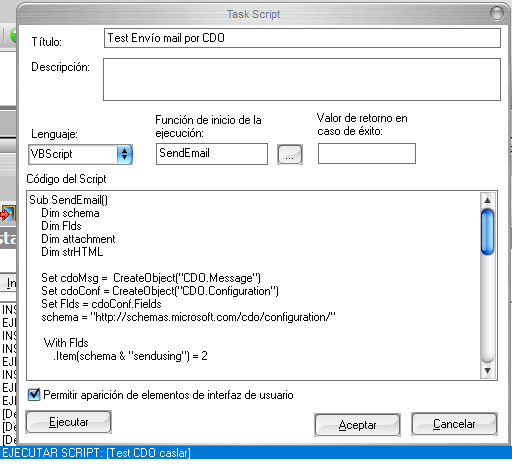
En concreto una configuración puede ser esta:
Sub SendEmail()
Dim schema
Dim Flds
Dim attachment
Dim strHTML
Set cdoMsg = CreateObject("CDO.Message")
Set cdoConf = CreateObject("CDO.Configuration")
Set Flds = cdoConf.Fields
schema = "http://schemas.microsoft.com/cdo/configuration/"
With Flds
.Item(schema & "sendusing") = 2
.Item(schema & "smtpserver") = "miserver.smtp.com"
.tem(schema & "smtpserverport") = 465 'o 587
.Item(schema & "smtpauthenticate") = 1
.Item(schema & "sendusername") = "administracion@miserver.com"
.Item(schema & "sendpassword") = "pwdmiserver"
.Item(schema & "smtpusessl") = 1
.Update
End With
' Apply the settings to the message.
With cdoMsg
Set .Configuration = cdoConf
.To = "soporte@apesoft.com" 'strRecipient
.From = "miremitente@miserver.com"
.Subject = "Asunto:@PAR(miasunto)"
.TextBody = "Body: @PAR(micuerpo) "
.AddAttachment "@PAR(TARGET_FILE_FULLPATH)" ' Fichero que genera el proceso
' If strCc <> "" Then .CC = strCc
' If strBcc <> "" Then .BCC = strBcc
.Send
End With
Set cdoMsg = Nothing
Set cdoConf = Nothing
Set Flds = Nothing
End Sub
Was this article helpful?
That’s Great!
Thank you for your feedback
Sorry! We couldn't be helpful
Thank you for your feedback
Feedback sent
We appreciate your effort and will try to fix the article